As a Senior IT Architect and tech blogger, I observe the rapid evolution of generative AI models with a constant focus on system architecture, process automation, and data security. Today, we are taking an in-depth look at the ecosystem surrounding Google Gemini based on the latest insights. This is not just about pure application, but about understanding the architectural mechanics behind it. We combine classic LLM foundational knowledge with 19 specific, sometimes highly hidden features that transform Gemini from a simple chat interface into a modular middleware platform.
- 1. Automation via CRON-like AI Triggers: Scheduled Actions
- 2. Multimodal Video Generation: Veo Models and Google Flow
- 3. Ecosystem Integration via OAuth & API Hooks: Connected Apps
- 4. Native Workspace Injection: Gemini in Gmail & Docs
- 5. Structured Data Output in Google Keep
- 6. Canvas Mode: An IDE for AI Output
- 7. Zero-Data-Retention & Privacy Engineering
- 8. Image Generation: Model Tiers (Nano Banana) and Watermarking
- 9. Specialized Agents: Gemini Gems
- 10. UI/UX Hacks & Hallucination Prevention
- 11. Spreadsheets meet AI: Google Sheets Integration
- 12. Native Data Visualization: Knowledge Graph Widgets
- 13. Persistent System Context: Instructions for Gemini
- 14. Code Interpreter & Interactive Mindmaps
- 15. AI Artifact Generation: Cross-Compilation
- Conclusion: The Evolution into an AI Operating System
1. Automation via CRON-like AI Triggers: Scheduled Actions
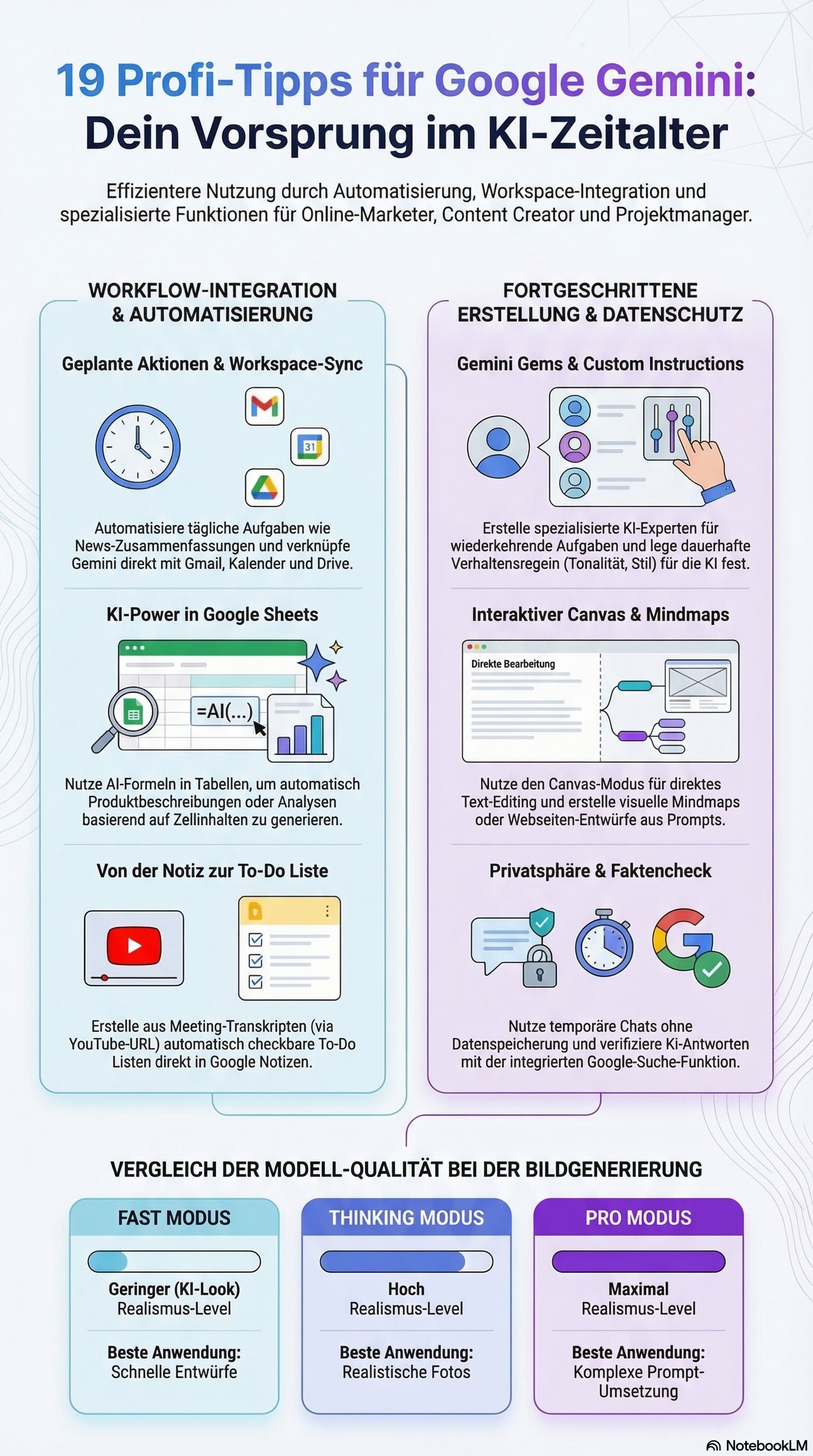
In classic system administration, we use CRON jobs for recurring tasks. Gemini natively adapts this concept through Scheduled Actions. Via settings (Gear icon -> Scheduled Action), the model can be instructed to execute asynchronous background tasks – such as a daily briefing at 9:00 AM. Architecture Insight: This transforms the reactive prompt-response model into a proactive, event-driven architecture, including mobile push notifications.
2. Multimodal Video Generation: Veo Models and Google Flow
While the high-end model Veo 3 is reserved for Pro users, the "architecture bypass" Google Flow offers access to video generation ("text-to-video") even in the free tier. Technical Stack: The Veo 1 Fast model is used here. The system renders two separate video clips (e.g., "a cat dancing on the table"), which can be combined as modular scenes.
3. Ecosystem Integration via OAuth & API Hooks: Connected Apps
An isolated LLM is worthless. Through the "Connected Apps" section, Gemini gains API access to the Google Workspace as well as external systems like GitHub or Salesforce (SF ID). System Behavior: The AI acts as an intelligent middleware agent with read and analysis rights for Gmail (e.g., "Summarize unread emails") and CRUD rights (Create, Read, Update, Delete) for the calendar.
4. Native Workspace Injection: Gemini in Gmail & Docs
To minimize context switching, the AI is injected directly into the apps. Setup Requirement: In the Gmail settings, "Smart features" must be strictly activated. Only then does the "magic pen" appear for inline replies or the panel for complex queries across the entire inbox.
5. Structured Data Output in Google Keep
The transition from unstructured text to task systems succeeds via the system call @Google Keep. Pro Tip: If API latency leads to a timeout, the prompt "Save in Google Keep now just like always" forces the system to successfully execute an interactive checklist.
6. Canvas Mode: An IDE for AI Output
Under "Tools -> Canvas," an integrated development environment for text and code opens up. Functionality: Users can highlight specific sentences, edit them inline, or seamlessly adjust length and tone via sliders. An analysis tool suggests contextual improvements that can be applied granularly.
7. Zero-Data-Retention & Privacy Engineering
Data protection is the knockout criterion in the enterprise environment.
-
Global Opt-Out: Under "Activity," training can be deactivated (Chat TTL: 72 hours).
-
Temporary Chats (Ephemeral State): An isolated, stateless container for highly sensitive prompts that never appears in the sidebar and feeds absolutely no training data.
8. Image Generation: Model Tiers (Nano Banana) and Watermarking
The image engine scales via the Nano Banana model.
-
Performance Levels: "Fast" (quick, artifacts) vs. "Thinking" vs. "Pro" (Nano Banana Pro for photorealism).
-
Post-Processing: All images carry an invisible watermark. Tools like geminiwatermarkcleaner.com or specialized browser extensions serve as intercept hooks for removal here.
9. Specialized Agents: Gemini Gems
What "Custom GPTs" are at OpenAI, are Gemini Gems here. They utilize Retrieval-Augmented Generation (RAG) through uploads of knowledge bases. Example Logo Generator: Hard guardrails are set via system prompts ("white background, minimalist"), whereby transparency (alpha channel) currently still represents a technical limit.
10. UI/UX Hacks & Hallucination Prevention
-
Organization: Pinning chats and emojis in the title (🔴 for priority).
-
Fact-Checking: Via "Verify response," the AI cross-references the output with the Google Search index and color-codes verified passages.
11. Spreadsheets meet AI: Google Sheets Integration
The syntax AI"[Prompt]";[Cell Reference] enables mass data processing directly in Sheets. An AIDA marketing prompt can thus be scaled across hundreds of rows like an Excel formula.
12. Native Data Visualization: Knowledge Graph Widgets
For real-time queries (weather, stocks, sports leagues), Gemini does not fire off walls of text, but visual UI widgets that access the Google Knowledge Graph API directly.
13. Persistent System Context: Instructions for Gemini
Under "Settings -> Instructions," we define the global context (e.g., "Company WP Erfolg, Focus on Online Marketing"). This calibrates the baseline temperature and tonality ("analytical, no filler words") for every new session.
14. Code Interpreter & Interactive Mindmaps
By combining Canvas and Thinking modes, interactive graphs can be generated. Prompt Instruction: "Create an interactive mindmap in the Code Editor." The system often uses Mermaid.js or generates runnable code for an interactive widget.
15. AI Artifact Generation: Cross-Compilation
Canvas mode allows direct conversion of texts into:
-
Flashcards
-
Audio Summaries (Podcast style)
-
Interactive Quizzes
-
HTML Structures
Conclusion: The Evolution into an AI Operating System
From the perspective of an IT architect, Google Gemini has long ceased to be a simple chatbot. The evolution from simple prompt-response cycles to stateful agents (Gems), asynchronous automations (Scheduled Actions), and deep API interweaving marks a paradigm shift. Those who master these architectural layers – from the system prompt level to API hooks to asynchronous execution – scale their operational processes exponentially.