As a Senior SAP Technology Consultant and tech blogger, I have been observing the tectonic shifts in the SAP landscape for years. The most significant change for us as administrators, developers, and architects is the impending end of the SAP Solution Manager. The move to SAP Cloud ALM is not just an upgrade – it is a fundamental paradigm shift in the way we conduct Application Lifecycle Management (ALM). In this extremely detailed deep dive, I merge foundational historical knowledge of the classic on-premise world with the latest technological facts from current SAP specifications.
- The End of an Era: The Sunset of SAP Solution Manager
- Architecture and Value Proposition of SAP Cloud ALM
- Implementation Lifecycle: From Design to Deployment
- Operations & Business Process Monitoring
- The Integration Ecosystem & Open APIs
- Strategic Transition: The Path from Solution Manager to Cloud ALM
- Conclusion
The End of an Era: The Sunset of SAP Solution Manager
Historically, the SAP Solution Manager was the undisputed, monolithic core of many SAP landscapes for over two decades. It was classically based on a dual-stack (or later separate ABAP and Java stacks), which caused enormous hosting and administration costs for databases, kernel updates, and infrastructure. In addition, the user interface of the Solution Manager evolved over the years into a veritable "zoo" of diverse UI technologies – from CRM UI and outdated Flash to modern Fiori approaches.
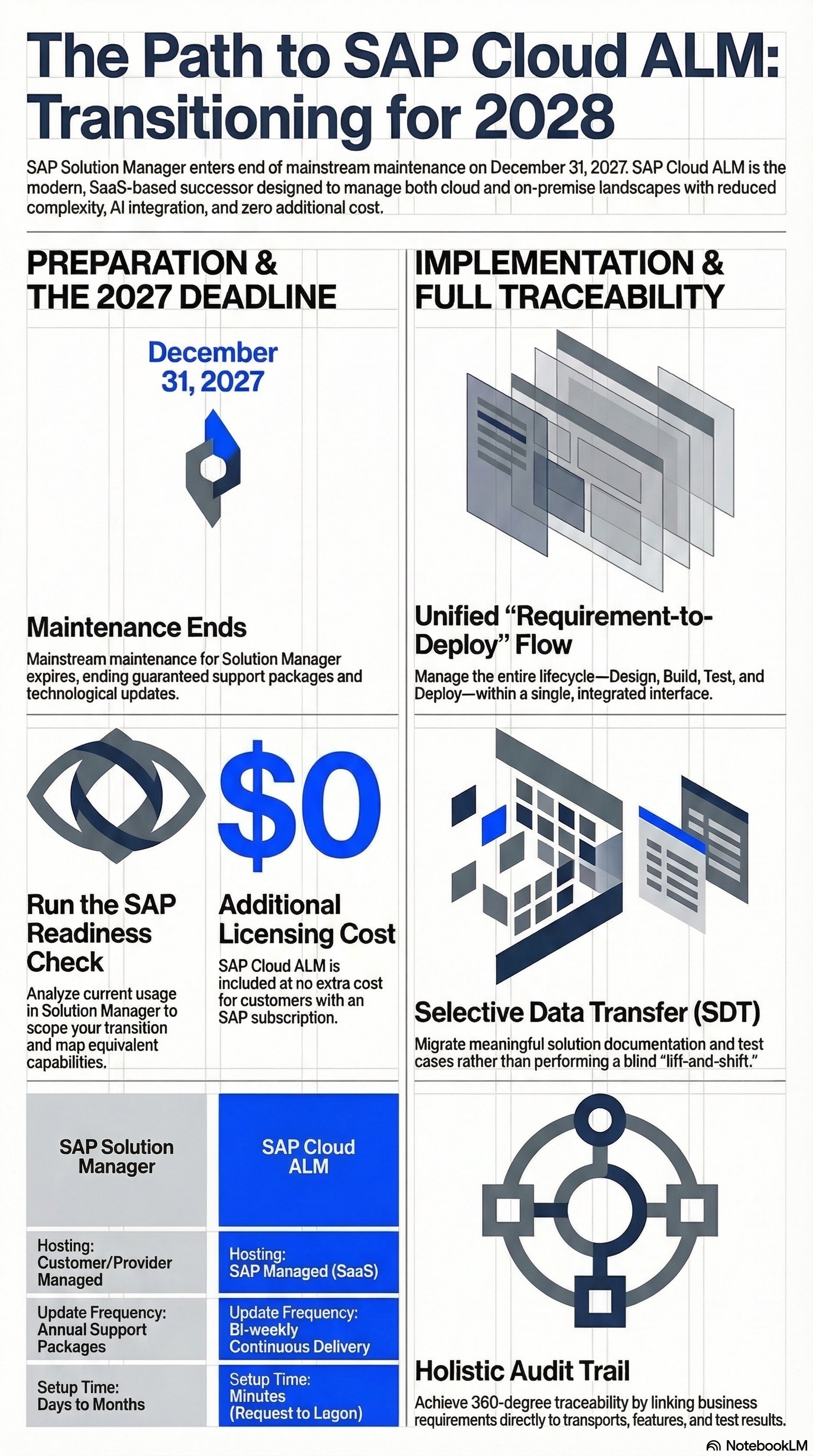
The hard cut is set: Mainstream Maintenance for the SAP Solution Manager ends on December 31, 2027.
What happens technically on January 1, 2028? The system will not spontaneously quit working; it will run exactly as it did the day before. However, drastic support restrictions will come into effect from this date:
-
No more Support Packages will be delivered.
-
There will be no more technological updates, neither for new kernel versions nor for new database releases.
-
No new patches will be provided for either ABAP or non-ABAP components (such as Java or frontend systems).
-
Support for new interfaces will be dropped, and there will no longer be guaranteed SLAs for support tickets.
-
Furthermore, SAP will not make any investments in Artificial Intelligence (AI) for the Solution Manager; these use cases are exclusively reserved for SAP Cloud ALM.
Architecture and Value Proposition of SAP Cloud ALM
SAP Cloud ALM is a cloud-native SaaS (Software-as-a-Service) solution, designed from the ground up to meet the requirements of modern IT landscapes today and tomorrow.
The core architectural and deployment benefits include:
-
No Infrastructure Costs: Since it is a SaaS model operated by SAP, there is no need for internal experts to maintain complex ABAP/Java stacks. SAP handles hosting, scaling, and patch management.
-
Agile Deployment: Unlike the Solution Manager, where deploying new features via Support Packages often took months to years, Cloud ALM utilizes daily background deployments and rolls out new features (feature updates) every two weeks.
-
Instant Provisioning: Setting up a Solution Manager could take days to months. With Cloud ALM, the tenant is easily requested via SAP for Me and is ready to use within 30 minutes.
-
Cost Model: For customers with an existing SAP subscription, there are no additional license costs for SAP Cloud ALM (assuming "fair use").
Implementation Lifecycle: From Design to Deployment
SAP Cloud ALM deeply integrates the SAP Activate methodology into its architecture, supporting projects seamlessly from the Discover/Prepare phase through to Deployment.
Design Phase & Fit-to-Standard
Instead of starting with empty systems as in the past, Cloud ALM delivers extensive Best Practices and Accelerators directly out-of-the-box. In the Process Authoring Tool, business processes can be modeled in detail (up to Level 4) and exported/imported as BPMN, SVG, or PDF. During Fit-to-Standard workshops, requirements are linked directly to these process hierarchies (Process Diagram Flows).
Build Phase: Agile vs. Waterfall & Requirement Management
The captured requirements (the "What") are granularly broken down into actionable User Stories and Tasks (the "How") during the Build phase. The system provides a complete Scrum framework:
-
PI Planning (Program Increment): Assigning requirements to specific timeframes and identifying technical dependencies in a Gantt chart view.
-
Sprint Planning & Daily Scrum: Managing tasks in sprints (e.g., Sprint 0 for Functional Specification Documents - FSD, later sprints for Development) via interactive Kanban boards.
A core technical element is the Feature object. A Feature acts as a logical container for transports in Cloud ALM. When code or configuration changes are made, the transports are tied to Features, which are in turn linked to the initial requirements. This enables seamless traceability.
Testing: Quality Assurance & Tricentis Integration
The testing architecture of Cloud ALM covers manual and automated test cases. Test cases are orchestrated in test plans, preparations are tracked, and defects are generated directly from failed test steps (including proof screenshots).
A massive technological advancement is the integration of third-party testing tools. A light version of Tricentis is natively integrated for test automation. Additionally, tools like Tricentis LiveCompare can be connected for test optimization.
Operations & Business Process Monitoring
While the Solution Manager focused heavily on technical monitoring, Cloud ALM places a stronger emphasis on the business level. The Operations Suite offers:
-
Business Process Monitoring: End-to-end transparency through predefined KPIs. For example, if inventory falls below a threshold of 10, the system automatically fires alerts.
-
Technical & User Performance Monitoring: Monitoring of job failures, system health, and anomaly detection through intelligent processing.
The Integration Ecosystem & Open APIs
Historically, heterogeneous landscapes suffered from the "dual-entry" problem: developers maintained tasks in Jira while transports were tracked in the Solution Manager. Cloud ALM solves this through open APIs and deep third-party connectors.
-
Bidirectional Jira & Azure DevOps Integration: Requirements in Cloud ALM flow automatically as "Epics" into Jira. Tasks become "User Stories". Updates synchronize in real-time.
-
ServiceNow: Focus on alerting in operational business as well as ITSM scenarios.
There are even direct connectors for Transport Management from Jira, Azure DevOps, and ServiceNow.
Strategic Transition: The Path from Solution Manager to Cloud ALM
A migration requires exact planning. SAP provides dedicated tools and best practices in the Transition Center for this purpose.
1. SAP Readiness Check for SAP Cloud ALM: This is the mandatory first technical step. By applying SAP Note 3236443 (or the latest SP) on the Solution Manager, the system is deeply analyzed. The check maps historical SolMan scenarios directly to Cloud ALM capabilities (including displaying the SAP roadmap for missing features) and thoroughly analyzes the landscape for selective data transfer.
2. Selective Data Transfer (SDT): If solution documentation or test cases need to be migrated, the concept of SDT applies. Here, specific libraries (e.g., Executable Libraries to the Application Library) and process diagrams are specifically transferred from the Design and Production branches of the Solution Manager to Cloud ALM.
3. Handling ChaRM & Focused Build: There are special whitepapers for Change Request Management (ChaRM) customers. Important architecture detail: Complex ChaRM functions like Retrofit are currently still on the roadmap for Cloud ALM and are not finally available. A hybrid usage (Cloud ALM for projects, SolMan for ChaRM) is possible for the time being. For Focused Build scenarios, SAP will implement functional equivalents in Cloud ALM by the end of the year that reflect the same "spirit" of a strict workflow for large projects.
4. Outsourcing Non-ALM Functionalities: The SolMan was often misused. Basic functions are now disappearing from the ALM focus: SLD (System Landscape Directory) and LMDB will no longer be transferred in the classic sense. Certificate management (Maintenance Certificates) and license management are moving to the Host Agent, the SL Toolset, or directly into the Maintenance Planner. The CUA (Central User Administration) must be outsourced to other NetWeaver or Identity Management systems.
Conclusion
The transition from SAP Solution Manager to SAP Cloud ALM is not a simple lift-and-shift project, but a strategic realignment. While the on-premise SolMan with its ABAP/Java stacks, complex setup times, and outdated UIs will be cut off from security-critical updates (OS, Kernel, DB) starting in 2028, Cloud ALM offers a SaaS architecture with weekly innovations, cutting-edge AI integrations, and native API openness to Jira and Tricentis.
The transition requires a clear understanding of the old data structures. The starting signal must be fired today with the SAP Readiness Check (Note 3236443). Especially in highly complex ChaRM setups or strictly regulated environments (Pharma), architectural dependencies like Retrofit must be tracked exactly on the SAP Roadmap. Those who correctly utilize the integrated traceability functions – from the Fit-to-Standard requirement to the Sprint feature and through to the productive transport – will massively accelerate their Application Lifecycle Management, save license costs, and future-proof their IT.