Welcome, tech community and SAP Basis colleagues! Anyone performing major system conversions, release upgrades, or database migrations in the SAP world cannot bypass one tool: the Software Update Manager (SUM). In this extremely detailed deep dive, we analyze the historical and current technical evolution of SUM with a hard focus on the architecture and best practices of 2022. We seamlessly combine classic Basis knowledge with the crucial upgrade mechanisms of the SAP S/4HANA era referenced in the latest upgrade guides and checklists.
The Historical Evolution: From SAPup to SUM 2.0
To understand the current architecture of SUM, we must take a brief look at its history. In the early days of the SAP R/3 and NetWeaver era, updates and upgrades were treated strictly separately. For Support Packages, the transactions SPAM and SAINT were used. For major release upgrades, standalone C programs like SAPup (for the ABAP stack) and SAPJup (for the Java stack) were utilized.
With the increasing complexity of dual-stack systems and the introduction of SAP HANA, SAP bundled these C routines into a unified framework: the Software Update Manager (SUM 1.0).
With the rise of SAP S/4HANA, SAP split the tool line: SUM 2.0 was born. SUM 2.0 is mandatory for all ABAP systems based on SAP NetWeaver 7.5 or higher and is the exclusive tool for S/4HANA System Conversions. Currently, SUM 2.0 is being continuously optimized for downtime reduction and cloud readiness through numerous Support Packages (like the latest SUM 2.0 SP13).
Architecture and Core Components of SUM 2.0
SUM is not a simple script, but a highly complex orchestrator controlling thousands of individual steps (Phases).
Execution begins with unpacking the SUM archive (via SAPCAR) into the directory /usr/sap/<SID>/SUM (as described in the UNIX-specific S/4HANA guides). Technical control lies with the SAPup process, which is now elegantly managed via the SUM ABAP Observer – usually through the modern, browser-based SL Toolset UI5 client.
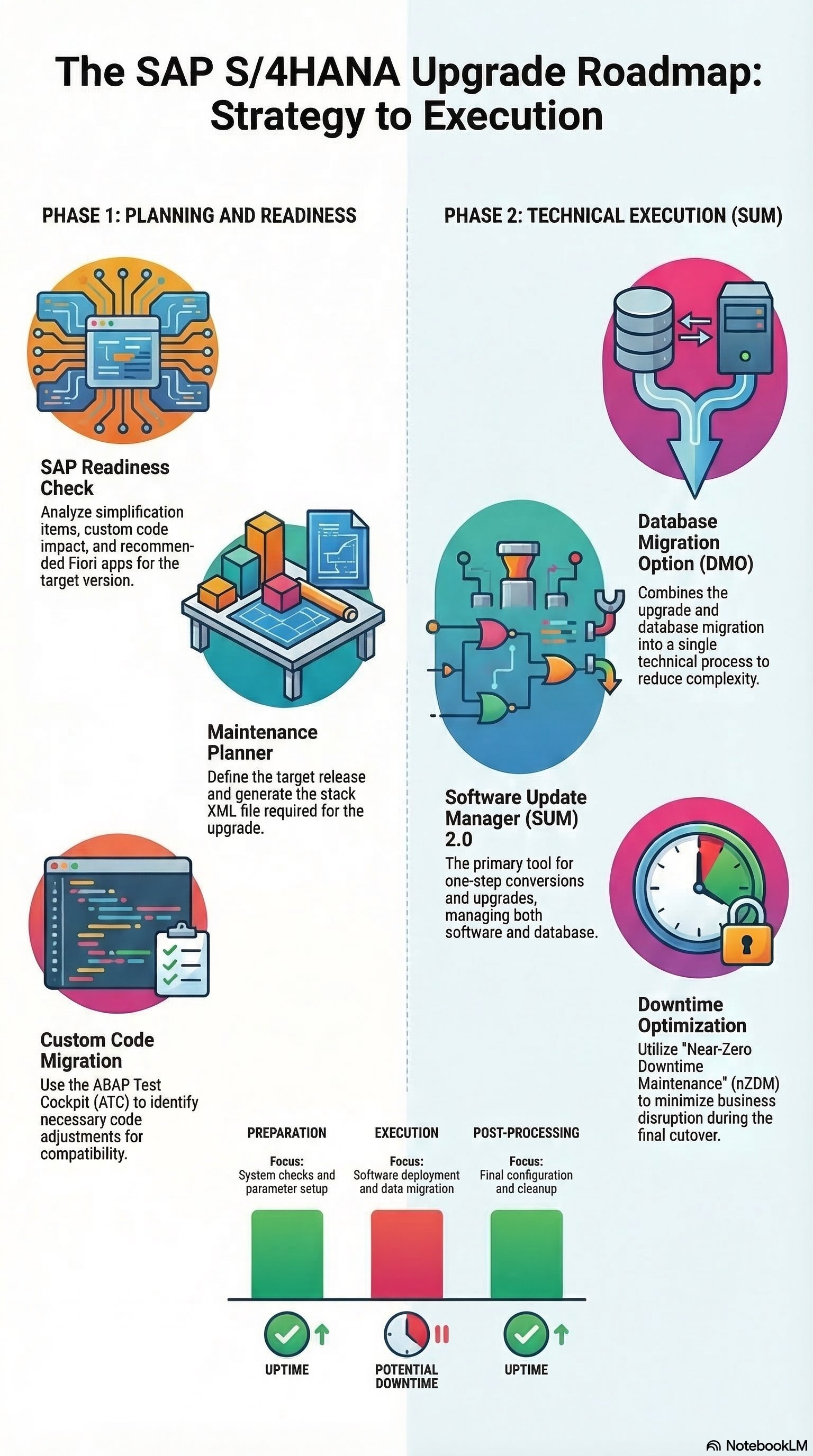
Configuration is largely governed by the Stack.xml. This file is generated in advance in the Maintenance Planner within the SAP Support Cloud, contains the exact Bill of Materials (BOM) of all required SAR archives, and defines the target release level (e.g., the jump to the current S/4HANA 2021 or preparations for the upcoming 2022 release).
The SUM Phases in Technical Detail
An in-depth upgrade with SUM 2.0 is divided into six main phases. None of these phases should be underestimated during planning:
-
Extraction (EXTRACTION): SUM reads the
Stack.xml, unpacks the archives, and initializes the upgrade directories. The fundamental SUM Dictionary is also built here. Important logs:STARTUP.LOG,SAPup.log. -
Configuration (CONFIGURATION): The interactive phase. The Basis Administrator sets parameters here, such as the number of batch processes (R3trans, R3load) and the downtime strategy. The target database is also connected here.
-
Checks (CHECKS): The essential preliminary checks happen here. SUM verifies free tablespaces and OS limits. Absolutely critical for S/4HANA upgrades (e.g., from release 1909 to 2021) are the Simplification Item Checks (SI-Checks). If the report
/SDF/RC_START_CHECKshows red traffic lights, SUM forces a hard stop. Important logs:CHECKS.TXT. -
Preprocessing (PREP): This is the technical masterpiece of SUM. While the productive system (
Uptime) continues to run fully, SUM builds a Shadow System. A second instance is booted up in parallel (with its own shadow repository). DDIC (Data Dictionary) activities, such as creating new tables and indexes, happen entirely in the shadow. Towards the end of this phase, the development environments are locked (Lock Development). Important logs:SHADOW_IMPORT_INC.LOG. -
Execution (EXECUTION - The Downtime): The moment of truth:
DOWNTIME_STARTS_HERE. The productive system is stopped. The shadow system takes the lead. The Switch Framework is activated, and tables are converted into the new namespace via R3load or R3trans. For migrations, the massive data transfer occurs here. The downtime depends heavily on the I/O performance of the hardware and the distribution of theR3loadprocesses. -
Postprocessing (POSTP): After starting the new system on the target release, SUM performs cleanups. The shadow system is deleted. Developers must now imperatively process the transactions SPDD and SPAU to reconcile SAP standard modifications with the new release.
The Revolution: DMO (Database Migration Option) & DMOVE2S4
One of the greatest innovations in the SUM architecture is the Database Migration Option (DMO). Historically (before 2013/2014), a migration to SAP HANA had to occur in two steps: First the upgrade (via SUM), then the database migration (via SWPM - Software Provisioning Manager).
DMO marries both processes: SUM 2.0 executes the release upgrade and the migration from AnyDB (Oracle, DB2, MS SQL) to the SAP HANA database in a single run.
A particularly exciting current architectural feature is the Homogeneous Option for DMO and the DMOVE2S4 scenario. While the classic DMO was primarily intended for heterogeneous migrations, SAP thereby enables homogeneous migrations (HANA to HANA) – essential when changing data centers, moving to hyperscalers, or for S/4HANA downtime optimizations. SUM utilizes highly advanced R3load pipes here to pump data memory-optimized directly from the source to the target without having to cache it on hard drives.
Current Downtime Optimization Strategies (As of 2022)
Since every minute of downtime costs real money in large ERP systems, SAP equips SUM with massive optimization techniques:
-
Near-Zero Downtime Maintenance (nZDM): Through a "Record & Playback" mechanism (CRR - Customer Relationship Repository), data changes (inserts, updates) made by users during uptime are recorded. These are replicated directly into the shadow system. This drastically reduces the necessary data transfer in the Execution phase.
-
Zero Downtime Option (ZDO): The premier class of SUM. Currently, ZDO is being massively expanded. End-users continue to work on a kind of clone of the database architecture while the upgrade is completed in the background. The final "downtime" is reduced to a mere application restart.
S/4HANA Upgrades: The Checklist for Conversions
According to current checklists and upgrade guides, a system upgrade to SAP S/4HANA (e.g., the path from release 1909 to 2021) requires meticulous preparation. The absolute technical baseline includes:
-
CVI (Customer Vendor Integration): The Business Partner Conversion must absolutely be completed on the ERP system before SUM is even allowed to start in the S/4HANA context.
-
Cleaning up the SI Catalog: As mentioned in the CHECKS chapter, unresolved Simplification Items are the most common reason for aborts in the PREP phase.
-
Spool and Job Cleanup: Reducing large
TST03tables and obsolete background jobs to drastically minimize R3load times during the Execution phase.
Currently, in early 2022, the SAP Basis world stands on the threshold of even deeper cloud integration due to the latest SUM releases, paving the way for future upgrades to S/4HANA 2022 and subsequent versions.
Conclusion
Today, in 2022, the Software Update Manager (SUM 2.0) has grown into a highly resilient, cloud-ready, and massively parallelized orchestration tool. What once began with simple SAPup C routines is now a masterpiece architecture bundling database migration (DMO), release upgrades, and complex S/4HANA Conversions into a single run.
For every ambitious SAP Technology Consultant: Exact mastery of the six SUM phases, a deep technical understanding of the shadow system, and the strategic use of features like the Homogeneous Option and nZDM are the guarantees for a successful S/4HANA transformation. Whoever understands the mechanics behind R3load pipes and can interpret log files flawlessly will guide the SAP system safely through every upcoming technical evolution.